Developing an Iceberg Optimization Skill
I've been working with Apache Iceberg for several years. In the last year I've been helping one of the most data-heavy organizations in Israel deploy it at scale — petabytes of data, multiple ingestion pipelines, constant schema evolution, several query engines reading the same tables. Exactly the kind of environment that stress-tests every assumption you had about the format.
Most of the problems weren't about scale. They were about not knowing what Iceberg is actually doing under the hood.
The pattern that kept repeating
Here's how it goes. A team discovers Iceberg, reads the getting-started docs, wires up the connector, and ships it. Everything looks fine — data is landing, queries are returning results. Six months later, a query that used to finish in seconds is taking minutes. The metadata layer is bloated. Compaction jobs run for hours without finishing. A partition strategy that made sense at ingestion time is now the read-time bottleneck.
The root cause is almost always the same: Iceberg has a lot of knobs, and the defaults were chosen for correctness, not for your workload. Partition specs, sort orders, file size targets, snapshot retention policies, manifest sizing, V1 vs V2 table format — most teams never touch any of them. They accept the defaults, the problems accumulate invisibly, and the first sign anything is wrong is a data engineer firefighting at 2am.
The deeper problem is that these mistakes don't fail independently — they stack. A poor partition strategy amplifies the cost of unoptimized file sizes. Unbounded snapshot accumulation slows partition pruning. Too many small files and the wrong delete mode turn a trivially fast CDC table into a read-time disaster. Each bad choice makes the next one worse, and the compounding is invisible until it isn't.
What I kept doing over and over
Every engagement, the analysis followed the same shape. Look at the partition spec — does it actually match the query patterns, or did someone copy it from a tutorial? Check the file size distribution. Query the files metadata table to see the split between data files and delete files. Check the manifest count. Ask whether equality or positional deletes are accumulating. Review the compaction policy. Ask what write pattern is driving this table and whether the layout was designed for it.
This is specialized knowledge. It took time to build, and it isn't well-documented in one place. The official docs tell you what each option does. They rarely tell you when to use it, or what the footgun looks like when you don't.
The skill
I codified everything I kept doing into a Claude Code skill (available on GitHub) — a reusable, promptable assistant that knows the bits and bytes of Iceberg and guides you through the decisions that actually matter for your workload.
The design principle is: observe before you ask, ask before you decide, simulate before you recommend. Rather than firing generic best-practice advice, the skill runs a structured diagnostic before it tells you anything. It can connect directly to your table, ingestion pipeline, and query engine — or, if you prefer, you export the metadata yourself, paste back the output, or supply pre-exported files. Either way, it stays read-only until you explicitly approve Phase 5's commands.
The six-phase flow
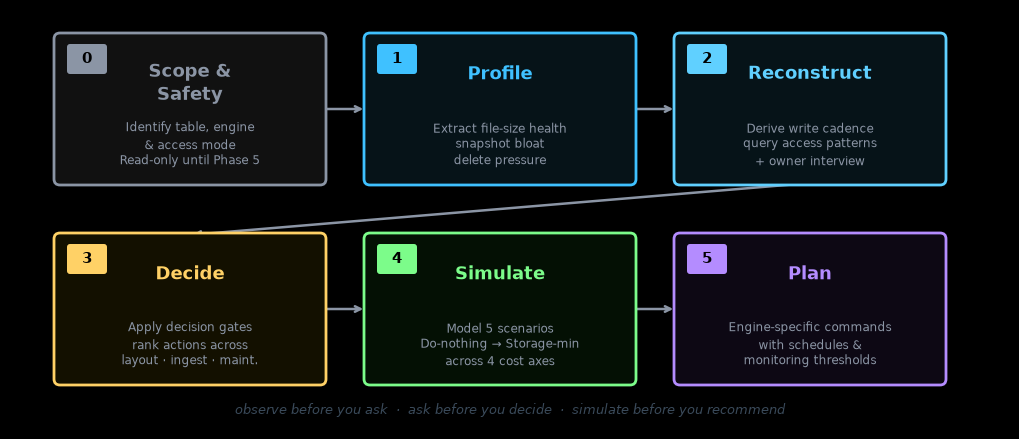
Phase 0 — Scope & Safety. Before touching anything, the skill identifies the target table, the engine (Spark, Trino, Glue/EMR, Snowflake, or Flink), and how it can access metadata — direct SQL, an exported file you provide, or queries it asks you to run. Nothing destructive runs until Phase 5, and expire_snapshots and remove_orphan_files require explicit sign-off each time.
Phase 1 — Profile. The skill extracts the physical state of the table from its metadata: file-size distribution, small-file pressure, snapshot and manifest bloat, delete-file accumulation, and an overall health signal. This is the baseline everything else builds on.
Phase 2 — Reconstruct. Two things happen here. First, the skill derives what it can from the metadata itself — write cadence, late-arriving data patterns, operation mix, partition-pruning effectiveness from query logs. Then it asks you only for the things that can't be inferred: latency SLA, freshness requirements, cost priorities, whether this table will ever receive updates, compliance constraints. The interview is targeted, not a generic questionnaire.
Phase 3 — Decide. With the profile and workload in hand, the skill applies a decision framework across three action groups: table layout (compaction strategy, partition evolution, format version upgrade), ingestion tuning (write distribution, file-size buffering, CDC mode), and maintenance scheduling (snapshot expiry, orphan cleanup, bloom filter configuration). It applies gates — for example, sort or Z-order only when queries are selective enough to amortize the rewrite cost.
Phase 4 — Simulate. Before recommending anything, the skill models five candidate scenarios: Do-nothing, Light, Targeted-sort, Aggressive, and Storage-min. Each is evaluated across four axes — query latency, query cost, maintenance cost, and storage — under the priority you've stated. The output is a directional comparison with ranges, not false precision.
Phase 5 — Plan. The winning scenario becomes a concrete plan: engine-specific commands with exact parameters, an execution order (ingestion tuning first, then layout, then maintenance), a schedule cadence, and monitoring thresholds that tell you when the next optimization cycle is due.
The skill handles Spark, Trino, AWS Glue/EMR, Snowflake, and Flink/Kafka Connect — each with engine-specific syntax, because the same compaction operation looks very different across these engines.
Benchmarks
Any optimization advisor is only as useful as its ability to handle the edge cases — the failure modes that only show up in production, under specific combinations of write pattern, engine, and table shape. I benchmarked the skill against 22 scenarios built from real failure patterns.
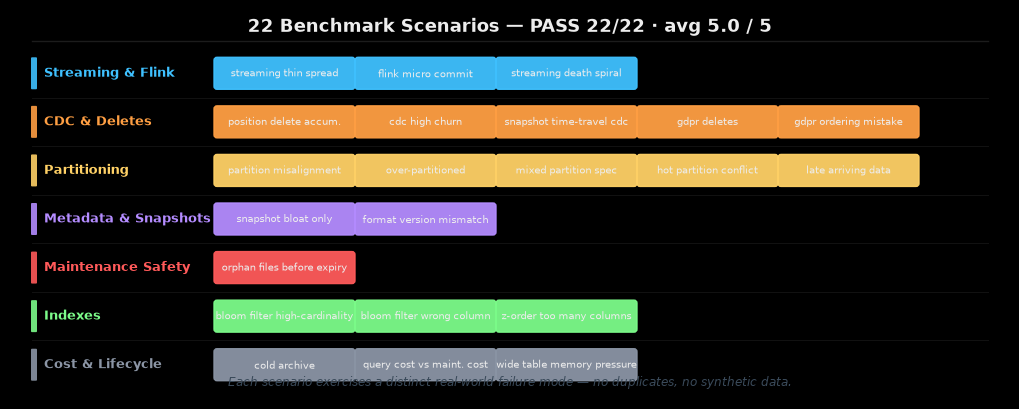
The scenarios cover seven categories of failure:
- Streaming & Flink — including the "death spiral" where ingest throughput permanently outpaces compaction capacity, which requires writer-side remediation, not just a compaction schedule.
- CDC & Deletes — GDPR physical row removal, position delete accumulation from merge-on-read CDC, high-churn tables where switching to copy-on-write is the right call, and the ordering mistake where you expire snapshots before compacting (leaving deleted rows accessible).
- Partitioning — misaligned partition specs, over-partitioned tables with thousands of tiny partitions, mixed specs from schema evolution, hot partitions that conflict with compaction, and late-arriving data patterns that invalidate the partition layout.
- Metadata & Snapshots — pure snapshot bloat without data file issues, and V1→V2 format version mismatches that block equality-delete operations.
- Maintenance Safety — orphan files that get deleted when you run expiry before compaction finishes. A sequence error, not a configuration error.
- Indexes — bloom filters on the wrong columns (low-cardinality or range-queried columns where min/max statistics already do the job), and Z-ordering over too many columns, which reduces locality rather than improving it.
- Cost & Lifecycle — cold archives where the compute cost of maintenance exceeds any query savings, and the query-cost vs maintenance-cost tradeoff where the right answer is to do less, not more.
The benchmark scores each plan with an LLM judge evaluating correctness, specificity, and safety. All 22 passed with a perfect 5/5 average.
Two things are worth noting about the benchmark design. First, every scenario is a distinct failure pattern — I didn't generate synthetic variations of the same problem. Second, the score checks not just whether the skill recommends the right action, but whether it recommends it for the right reason and with the right caveats. A correct answer for the wrong reason scores lower.
This is v0.1
All five engines are supported. The 22 failure modes above are covered. Twenty-nine unit tests pass across the profiler and query-log parser.
What's missing: support for other query engines such as DuckDB, deeper multi-engine write coordination, large-scale migration scenarios (Hudi-to-Iceberg, Delta-to-Iceberg), Z-ordering tradeoffs at very high cardinalities, and more efficient token usage as the prompt structure matures. This is a starting point, not a complete reference.
As the skill gets used on more real deployments, the patterns will sharpen and coverage will expand.
A call to the community
If you've been in the trenches with Iceberg — if you've hit the manifest bloat, the equality delete performance cliff, the partition evolution footguns — your hard-won knowledge is exactly what makes something like this useful. The difference between a generic best-practices checklist and a tool you actually trust is lived experience encoded into it.
We're inviting the Iceberg community to collaborate. Head to github.com/itamarwe/iceberg-optimizer-skill and open a PR with a pattern you've hit, a recommendation you'd add, or a scenario where the current guidance gets it wrong. The more real-world knowledge goes in, the more useful it gets for everyone who comes after.
The format is designed to be extended — new engines, new ingestion patterns, new maintenance scenarios, new benchmark fixtures slot in cleanly.
Why this matters more than it might seem
Most "AI for data" projects I see hit a wall that has nothing to do with the AI. The model is fine. The queries are reasonable. But the underlying tables are so poorly maintained that the data they're reading is stale, slow, or subtly wrong.
Iceberg is foundational infrastructure. How you design and maintain those tables shapes everything that reads from them — dashboards, analytics, AI agents. Getting it right isn't glamorous, but getting it wrong silently poisons everything above it.
That's the thing most teams learn too late. I'd rather they learn it earlier, from a tool, than the hard way at 2am.