The Dolly Zoom, From the Inside
You've seen it a hundred times. A character stares down a hallway, the camera holds them dead centre at exactly the same size — and yet the walls seem to lunge toward them, the far end of the corridor rushing in or falling away. It's the shot Hitchcock invented for Vertigo, and it shows up every time a director wants to put unease on screen without moving the actor. The dolly zoom.
Where you've seen it
Hitchcock built the first one for Vertigo (1958) to sell a detective's terror of heights. But the most famous example is Spielberg's — the beach in Jaws (1975), the instant Chief Brody realises the shark is real and the world snaps tight around him:
Chief Brody's reaction shot in Jaws (1975, dir. Steven Spielberg, Universal Pictures). Watch his head stay fixed while the beach behind him lurches — full clip on YouTube.
From there it became cinematic shorthand for a mind lurching: the Goodfellas (1990) diner as Henry's paranoia closes in, the Ringwraith stalling the hobbits in The Lord of the Rings (2001), even a wide-eyed Ratatouille (2007). There's a whole supercut of them set to Bernard Herrmann's Vertigo score. Once you know the move you can't unsee it — so what is actually happening?
The effect feels like an optical illusion, but it's pure geometry. I wanted to take it apart — so I built a 3-D scene with two views side by side: on the left, what the camera sees; on the right, a top-down map of where the camera actually is and how its field of view fans out across the scene. Drive the slider and both update together:
It's a soldier on a road through a valley in southern Lebanon — pine and cypress on the slopes, ridgelines on the horizon, a second soldier standing 100 m back. The foreground soldier never changes size. Everything behind him does: the mountains swell, the forest crowds in, and the distant soldier balloons from a speck into a presence right over his shoulder. The top-down view tells you why — watch the camera slide backwards down the road while its view-cone narrows to a sliver.
Two knobs, moving in lockstep
A dolly zoom is two camera moves performed at once, tuned to cancel each other for exactly one object in the frame:
- Zoom — you lengthen the lens. The field of view narrows, magnifying everything uniformly.
- Dolly — you physically roll the camera backward, away from the subject.
Zoom in and the subject would grow; dolly back and it would shrink. Do both in the right ratio and the subject holds perfectly still. The trick is that these two moves don't cancel for anything at a different distance — and that's where the whole effect lives.
The one equation
An object of real height sitting at distance from the camera, seen through a lens with vertical field of view , fills this fraction of the frame:
To keep the subject pinned at a constant on-screen size, you hold the denominator constant:
So when you narrow the field of view (smaller , longer lens), you must increase by the same factor — dolly the camera back. That's the entire rig in one line.
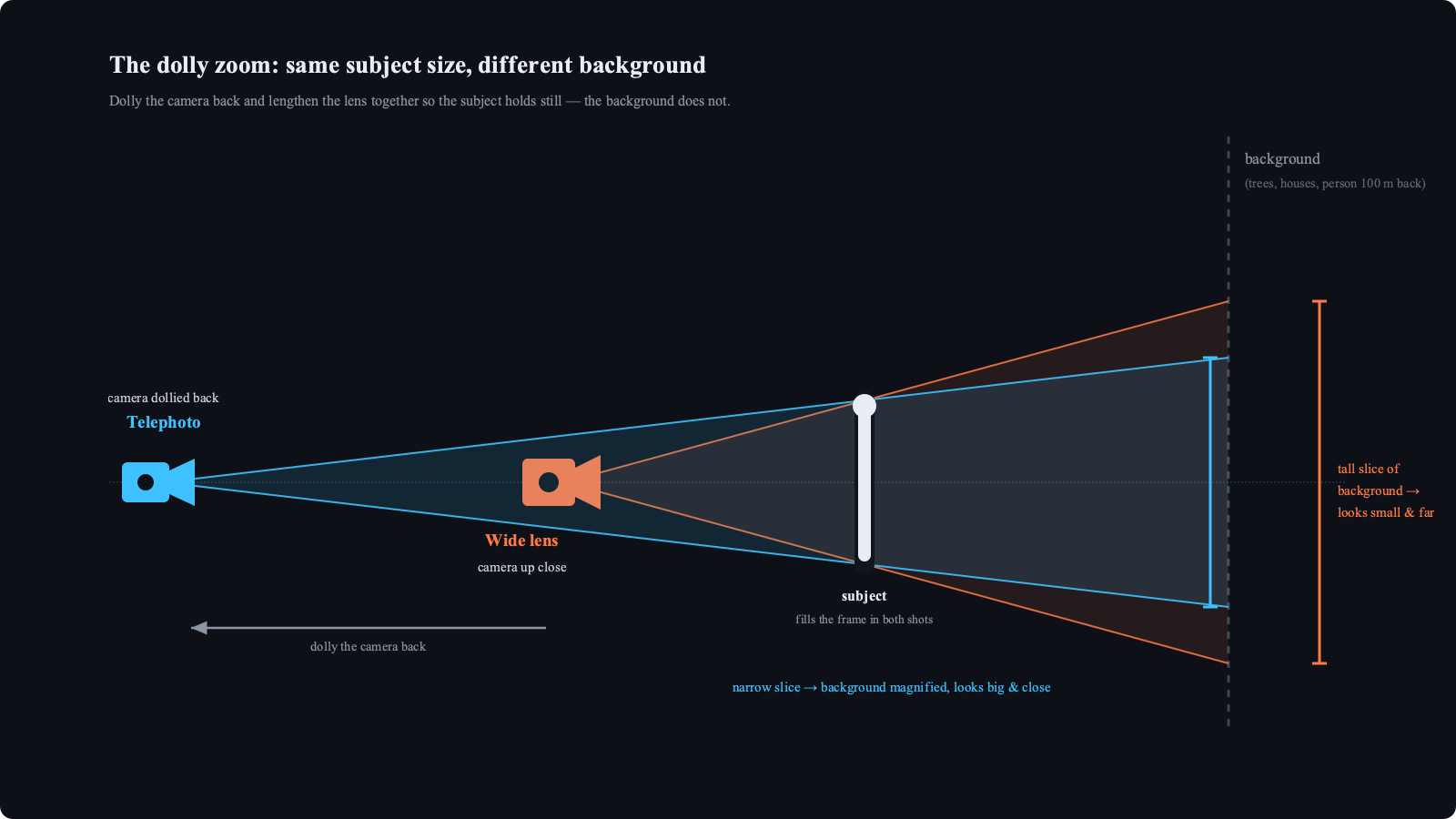
Both cameras above frame the subject identically — the subject fills the frame either way. But trace each lens's cone out to the background: the wide lens up close spreads its rays into a tall slice of the world, so any given tree or ridge occupies a small fraction of that slice and looks far away. The telephoto, dollied back, captures a narrow slice — the same tree now fills most of the frame and looks like it's breathing down the subject's neck. This is exactly the view-cone you can watch widen and narrow in the top-down panel of the demo.
The intuition: it's all about relative distance
Forget lenses for a second. How big something looks comes down to one thing — its distance from the camera. Double the distance, halve the apparent size.
So fix a gap of between our two soldiers and just move the camera. The far one's apparent height, relative to the near one, is simply the ratio of their distances:
| Camera → near soldier | Far soldier is at | Far soldier's apparent height |
|---|---|---|
| 100 m | 200 m | 50% — half size |
| 500 m | 600 m | 83% |
| 1 km | 1100 m | 91% — only ~10% smaller |
From up close, that fixed 100 m gap halves the far soldier — your eye reads deep space instantly. From a kilometre away, the same 100 m gap barely registers: the two are within 10% of each other, nearly identical. Near and far have collapsed onto the same apparent plane. That's depth compression, and it's why a telephoto shot of a city looks like the buildings are stacked flat against each other.
A dolly zoom just animates this. As the camera in the demo retreats from 6 m to 240 m, the two soldiers slide from an obviously-deep ratio to a nearly-flat — and you watch the depth drain out of the shot in real time. The long lens isn't doing the compressing; it's only there to blow that flattened image back up so the foreground soldier still fills the frame.
It's the dolly that compresses, not the zoom
Here's the part that surprised me. Put the background object at distance , where is the fixed gap behind the subject (100 m in my scene). Its size on screen, relative to the subject, works out to:
Notice what's not in that expression: the focal length. The lens dropped out entirely. Zoom magnifies the subject and the background by the same factor, so it can never change their ratio. The only thing that moves the ratio is , the dolly distance.
- Camera up close, small: is tiny, so the background is crushed down — small and far.
- Camera dollied back, large: climbs toward 1, the gap stops mattering, and the background swells to nearly the subject's relative scale.
So the dolly is doing the dramatic work — collapsing or expanding depth. The zoom is just bookkeeping that holds the subject still so your eye has a fixed anchor to measure all that motion against. Strip the zoom away and you'd still get the compression; you just wouldn't notice it, because the subject would be sliding around too.
Drive it yourself
The demo below is fully interactive — drag the slider, or hit Auto to let it sweep. Push it from 1× toward 40× and watch the lens climb from a wide ~23 mm into deep telephoto past 900 mm, the dolly distance stretch from 6 m out to 240 m, and the field of view collapse from 55° down to about 1° — all while the soldier stays exactly where he is.
Keep one eye on the top-down map, which is drawn to a fixed scale — the two soldiers never move on it. The cyan wedge is the camera's field of view; as it narrows, the camera glyph is the only thing that slides, rolling backwards down the road to hold the subject's green marker at the same apparent size. By 40× the tan marker 100 m back has been swallowed inside a 1°-wide sliver of a cone. The readouts along the bottom are the whole point: every parameter that produces the effect, live and coupled.
The physics here is over a century old, and the shot itself is 70. But there's something clarifying about being able to grab the two knobs yourself and feel how rigidly they're coupled — how the most disorienting shot in cinema is really just , held steady while everything behind it gives way.